Analytics
How Does Server-Side Tracking Work | Complete Guide 2026
Key takeaways
Server-side tracking sends the data collected in the browser to a server you control, on your own domain, and only from there to GA4 and your advertising platforms. In 2026 the real driver isn't cookies disappearing from Chrome (they haven't) but signal lost to ad blockers, ITP and short-lived cookies. Two pieces work together: Google tag gateway serves Google tags from your domain, while server-side GTM moves tag processing to your server, where conversions are sent via API with deduplication. It never bypasses consent: Consent Mode v2, mandatory in the EEA/UK since March 2024, must be respected on the server too.
What is server-side tracking?
Server-side tracking is the method where data about user activity is first sent to a server you own and control, on your own domain, and only from there onward to third parties (GA4, Google Ads, Meta, TikTok, etc.). It's the opposite of client-side tracking, where the browser sends data straight to each platform. Data is still collected in the browser, but it travels through an intermediate point you own, where you can filter, clean and enrich it before sending anything out.
For sites with complex interactions, such as online stores or high-volume platforms, this difference decides how complete and accurate the data behind your decisions is.
Why do you need server-side tracking? The key benefits
In short, because browser-only measurement loses more and more signal, and platforms end up optimizing on incomplete data. Here's why server-side tracking matters and what its key benefits are:
- More complete and accurate data: you recover part of the conversions blocked by ad blockers and browser restrictions.
- Faster pages: you remove heavy third-party libraries from the browser, so load time drops (a UX and SEO benefit).
- Control and privacy: you decide what data leaves your site, you can remove or anonymize personal fields, and you no longer depend on each vendor's "black box".
- Better match quality: hashed first-party data sent via API helps platforms match more conversions to the right users, which feeds the bidding algorithms.
- Business-data enrichment: you can add margin, product cost or a lead's status, so you optimize on value, not just clicks.
How server-side tracking works, step by step
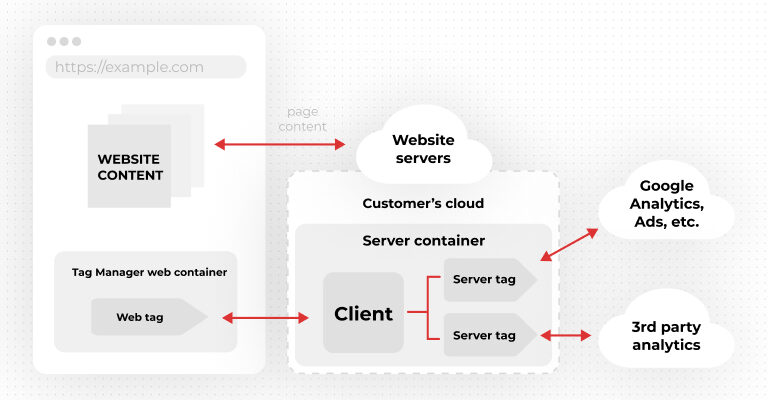
A web container or a Google tag still collects interactions in the browser (page views, clicks, forms, ecommerce events) and sends them to your tagging server, instead of straight to dozens of vendors. On the server, a container (usually server-side Google Tag Manager) receives those requests, turns them into events and decides, through tags, triggers and variables, what data gets sent on and to whom.
Because the server runs on your domain, the cookies it sets are first-party and last longer, and your pages no longer load every platform's heavy libraries. You gain full control over the shape of the data, its destination and the permissions of each tag.
Does server-side tracking use cookies?
Yes, but differently. Server-side tracking doesn't remove cookies; it changes who sets them. Instead of third-party cookies dropped by browser scripts, your server, on your own domain, sets first-party cookies. These are more durable because they don't fall under the same restrictions as third-party ones: in Safari, ITP aggressively shortens browser cookie lifetime, and many blockers stop them entirely.
Worth clarifying in 2026: third-party cookies have not been removed from Chrome. Google dropped several Privacy Sandbox APIs in October 2025 and kept its current approach. So the reason for server-side is no longer "cookies disappearing in Chrome", but signal loss from ad blockers, ITP and short cookie lifetimes, plus the need for more complete data for platforms.
Should I use client-side or server-side tracking?
In practice, the answer isn't either-or, but a combination: most setups keep browser collection for interactions and complement it with a server-side layer for control, accuracy and platform delivery. The main differences:
| Criterion | Client-side | Server-side |
|---|---|---|
| Where it runs | Tags run in the user's browser | Processing moves to your (first-party) server |
| Accuracy | Affected by ad blockers, ITP and extensions | More complete and stable |
| Cookies | Mostly third-party, short-lived | First-party, more durable |
| Page speed | Heavy third-party libraries in the browser | Faster pages, fewer scripts |
| Data control | Limited; vendors collect automatically | You decide what leaves and to whom |
| Cost and effort | Minimal, from the UI | Hosting + technical support + monitoring |
| Best for | Small sites, quick setup | Ecommerce, high volume, serious media budgets |
Simple rule: the more you invest in media and the more conversion accuracy matters, the more value server-side brings.
Traditional GTM vs. server-side GTM tracking
In a traditional setup, a GTM container loads on the page and sends data to several collection servers (GA4, Google Ads, Meta, etc.). The web container executes tags in the user's browser; it's simple and flexible, but it slows the page and makes you dependent on third-party vendors.
In a server-side setup, the page no longer loads third-party libraries, only the code that captures events and sends them to your tagging server. The container is hosted on a server under your control (Google Cloud, Stape or another environment). This lets you control the shape of the data, decide where it goes, use sandboxed JavaScript, assign permissions per tag and set boundaries around the container.
Google tag gateway vs. server-side GTM
These are two different, complementary things. Google tag gateway (reached general availability on May 8, 2025) serves Google tags from your domain, through your CDN (Cloudflare at launch, Akamai and Fastly in 2026) or your tagging server. The tags still run in the browser, but they load and send data from your own domain, which makes them more resistant to blocking. For many sites, it's the fastest first step toward first-party measurement.
Server-side GTM goes further: it moves tag processing to your own server, works for any platform (not just Google) and lets you filter, deduplicate and enrich data. For the most durable setup, Google recommends pairing the two. As a rough indicator from a vendor source, Cloudflare reported an average ~11% uplift in signals for early testers (treat as indicative).
Server-to-server conversions: the advertising platform APIs
From your server, conversions are sent to platforms through their dedicated APIs, not through browser pixels: Meta Conversions API, Google Ads enhanced conversions, TikTok Events API and the equivalents on other platforms (including newer surfaces like ChatGPT Ads). We send hashed first-party data, so platforms match more conversions to the right users.
The critical step is deduplication: the same conversion can be sent from both the browser and the server, so we use shared event IDs to count it once. Without deduplication, you report inflated conversions.
Consent Mode v2 and GDPR
Server-side is not a way around consent. Consent Mode v2 has been mandatory for Google Ads services in the EEA and UK since March 2024 and uses four signals (ad_storage, analytics_storage, ad_user_data, ad_personalization), together with a certified consent platform (CMP). We carry these signals from the browser to the server, so every tag respects the user's choice.
Compliance doesn't depend on the technical architecture, but on the consent you collect and the data you share. In fact, server-side gives you more control: you can minimize, anonymize and document exactly what each platform receives. Consent must be respected both on the client and on the server.
Which CDPs support server-side tracking?
If you need more than tag management, CDPs (Customer Data Platforms) collect, unify and send data server-side to multiple destinations. The most widely used that support server-side collection and forwarding are Segment (Twilio), RudderStack, mParticle and Tealium. Many offer server-side libraries and direct connectors to advertising and analytics platforms.
For most sites, server-side Google Tag Manager (hosted on Stape or your own cloud) covers tracking needs without the cost and complexity of a full CDP. The choice depends on how many sources and destinations you have and how much you work with unified customer profiles.
How does server-side tracking affect analytics cost?
Unlike client-side tracking, which is essentially free, server-side involves hosting the tagging server. The cost depends mainly on traffic volume and request count. On Stape you pay a subscription sized to traffic; on your own cloud (Google Cloud, AWS) you pay for infrastructure resources.
On top of that come technical support and monitoring, and if you enable export to BigQuery for raw data, storage and processing costs apply. The good news: for most sites costs stay reasonable and are estimated upfront, based on volume.
Why healthcare teams adopt server-side tracking
In healthcare, data is sensitive (health data, PHI) and regulations are strict (GDPR for health data in the EU, HIPAA in the US). Classic browser pixels have caused real problems, sending third parties information that should never have left the site. Server-side tracking fixes exactly this exposure: data passes through your server first, where you can remove or anonymize sensitive fields before anything is sent to a platform.
Beyond compliance, healthcare teams gain an extra benefit: they can measure campaign performance without exposing personal data, keeping control and a clear record of what is shared. The same principle applies in finance, insurance and other regulated fields.
When is server-side tracking worth the effort?
Server-side tracking has downsides too, so not every site needs it. It's worth it when:
- You invest significant media budgets and need complete conversions and good match quality.
- You visibly lose signal to ad blockers, ITP or short-lived cookies (we measure this in the audit).
- You have strict privacy requirements or operate in a regulated field.
- You want to enrich events with business data (margin, lead status) and optimize on value.
It's not worth it (yet) for a small site with low traffic and no media budgets, where hosting cost and technical support outweigh the gain. Downsides to keep in mind: hosting costs that grow with volume, the need for technical support and ongoing monitoring, and the loss of browser-level transparency for the end user.
How to get started with (and implement) server-side tracking
This is also the process we follow at Data Revolt on server-side tracking projects. A correct implementation doesn't switch off existing tracking overnight: it runs both in parallel until the numbers confirm the new setup. The typical steps:
- Audit & architecture — we compare what GA4 and the platforms record with your backend, review tags and consent, then choose the approach: Google tag gateway, server-side GTM or both, and where the server runs.
- Server setup — on Stape or your own cloud, connected to your domain, with the server container configured.
- Migration & integrations — we move GA4 and platform tags to the server, set up the APIs, deduplication, consent rules and data enrichment.
- Parallel validation — we run both setups and compare event volumes with your backend and each platform, checking deduplication, match quality and consent states.
- Go-live & monitoring — we switch to the new setup, hand over documentation and monitor the server, costs and event delivery.
A typical setup takes about 2-4 weeks, including parallel validation; complex setups with several platforms or backend events take longer.
Our server-side tracking service: what we handle
At Data Revolt we don't just explain server-side tracking; we implement it end to end and put it to work for your campaigns. We take on the full technical side, so you're left with complete data and decisions based on it. Here's what we cover:
- Architecture & hosting: on Stape we configure and manage the server; on your own cloud (Google Cloud, AWS), your IT team runs the server and we configure the container and the migration.
- Server-side GTM container: clients, tags, variables and the transformations that clean or remove fields before any data leaves your server.
- Google tag gateway: Google tags served from your domain, through your CDN or the tagging server.
- Advertising platform integrations: server-to-server conversions via Meta Conversions API, Google Ads enhanced conversions and TikTok Events API, with deduplication and match quality.
- Consent & control: Consent Mode v2 from browser to server, plus minimization and anonymization of personal fields.
- Business-data enrichment: margin, product cost, lead status and events sent from your backend or CRM.
We run the old and new setups in parallel until the numbers confirm the new one, then hand over documentation and monitor the server, hosting costs and event delivery to each platform. Explore our Analytics services or request an assessment at hello@datarevolt.agency, where we measure how much signal you lose today before you decide.
Conclusion
Server-side tracking has moved from "nice to have" to a necessary layer for any serious digital business that measures its results. It's not a trick to bypass regulation, but a way to collect more complete, cleaner data, under your control, while respecting user consent.
With Google tag gateway and server-side GTM, conversions sent via API with deduplication, and Consent Mode v2 set up correctly, you get data you can trust and that bidding algorithms can actually use. If you want to assess how much signal you lose today and whether it's worth the effort in your case, drop us a line at hello@datarevolt.agency.
FAQ
Do I still need tags on my website?
Yes. A web container or a Google tag still collects interactions in the browser and sends them to your server. What changes is that most third-party pixels no longer load on your pages.
Does server-side tracking work for mobile apps too?
Yes. A server container can receive data from mobile apps as well, not just from the website, so measurement stays unified across web and app.
Does server-side tracking add delay to data collection?
Not for the user: the server processes requests in real time. If anything, page speed improves, because you remove heavy third-party libraries from the browser.
Do I lose historical data when I move to server-side tracking?
No. Historical data in GA4 stays, because you keep the same property. The migration runs in parallel with the existing setup, so there are no gaps in reporting.
Can I implement server-side tracking without my own dev team?
Yes. On Stape we configure and manage the server, so you don't need your own infrastructure or in-house IT. On your own cloud, we work alongside your technical team.
What happens to measurement if the tagging server goes down?
That's why we monitor the server after launch. Correctly sized hosting and monitoring reduce the risk, and any short outage only affects collection during that window, not data already sent.
Can I use server-side tracking across multiple domains or subdomains?
Yes. A server on your domain can serve several subdomains and, with the right setup, multiple sites, while keeping cookies first-party.
Can I move only certain tags to the server, not all at once?
Yes. You can start hybrid, moving high-impact tags first, such as your main conversions, and expand gradually as you validate the results.
“We have started to implement server-side tracking and already see advantages like: better page loading, single point of data processing (GTM Server Side container) and better control over data sent to 3rd parties. But also we still wait for other platforms that we use to offer a solution to send data to them from a tracking server.”
— Alexandru Dima, Head of Development, Data Revolt
Technically reviewed by Marian, Head of Data.
Sources: Google tag gateway (Google Developers docs; PPC Land) · Google Tag Manager release notes · Privacy Sandbox / Consent Mode v2 (industry sources).