Analytics
How to use enhanced eCommerce on non-eCommerce websites

This was a challenging task that I had to accomplish during the early stages of my newly adopted career path as a Data Analyst. The question is neither easy or hard to answer, because it mostly depends on your creative imagination.
The main purpose of this article will be to offer you some degree of guidance in adapting the existing tools and infrastructure that Google Analytics offers, leaving you to do the heavy lifting.
Firstly, let’s answer an important question:
Why should we use enhanced ecommerce on non e-commerce websites?
[caption id="attachment_1048" align="aligncenter" width="300"] Why should we use enhanced ecommerce on non e-commerce websites?[/caption]
The answer is, really, why not?
Every website has the purpose of transmitting information to the user, which we’ll be referring to as data. This data can be outputted by the website’s developers in the form of text, images, videos and in some cases even music.
The user’s role is to interpret the received data and to take actions according to their own needs.
Our role is to understand what was the reasoning behind their choices, how can we improve their experience and how can we gain valuable knowledge based on their actions.
What Google Analytics provides is a predefined way to process and understand data. In its non-ecommerce form, it offers a bundle of information which could be sufficient for some, but limiting for most.
If you’re one of the latter, here’s some of the questions that the enhanced ecommerce implementation answers:
- How many of your products were seen and where?
- Which products were clicked from a specific listing?
- Which products made your users return?
- Which promotional banners were more effective?
- At which point do our users stop browsing our website?
- Which products present the most interest to our users?
- What is the drop-off rate on each funnel step?
- How many conversions do we have and why?
The first step that we should take before we venture on to implement enhanced ecommerce would be to find out what’s the most relevant data our website provides to its users?
[caption id="attachment_1051" align="aligncenter" width="300"] what’s the most relevant data our website provides to its users?[/caption]
For a website managing doctor appointments, our product could be the doctor’s overview webpage and we could build all other actions based on our product.
Here’s an example containing most enhanced ecommerce events:
- Product impressions: A listing containing all available medical doctors or listings based on their specialties;
- Product Clicks: What medical doctors were clicked from a specific listing;
- Product Details: A doctor’s overview page;
- Add to Cart: Click on the Make an appointment button;
- Promotion Impressions: Homepage banners visibility;
- Promotion Clicks: Homepage banners clicks;
- Checkout Steps: Filling each required field in the appointment form;
- Purchases: Successfully sending the appointment request.
Each event has its own parameters that need to hold values before we can send it to Google Analytics. If you need instructions on how to build your enhanced ecommerce objects, you will need to follow the steps presented in the Enhanced Ecommerce (UA) Developer Guide. In this guide, you can also find out how to create Google Tag Manager tags for each event.
To continue our list of examples, let’s assume that we’re working on a video hosting website. In this case, our products would be the hosted videos, and each event can be adjusted to suit our needs.
A possible conversion event would be to watch a video to a specified percentage, our checkout funnel could consist of several percentages of watch times from that video, the add to cart would become playing a video and so on.
Another common example would be websites built to promote specialized services which offer no direct way to purchase a product. These services will become our product and we could use the contact form completion as a conversion, marking the last service details page visualized as our purchased product.
For blogging websites, the obvious choice for our product would be the posted articles and a RSS feed / newsletter subscription could become our conversion.One of the questions that you will need to answer as you proceed through is:
How can you access the dataLayer values from browsed pages?
[caption id="attachment_1054" align="aligncenter" width="300"] How can you access the dataLayer values from browsed pages?[/caption]
This question will occur if your conversion action will not take place on the same webpage as your product details page. To put things in perspective, the dataLayer is a global variable available on all pages that is used to store some information available on the currently active webpage.
This means that on the product page, we can push into the dataLayer some information about that product (article name, url, photo, category). When we navigate to the conversion page, the dataLayer does not hold the values collected on the product page.To solve this problem, you’ll need to apply a solution available on Simo Ahava’s website, which we’ll gladly recommend anytime we’ll get the chance.
This particular solution is allowing us to store each dataLayer value from any webpage that would contain the script into a variable named _dataLayerHistory, which will give us the possibility to access all required values (in our case, the last product details page visited).
I won’t go into detail about the methods used to populate the purchase object, but I am certain that with a bit of JavaScript research, you will be able to achieve your goal, if you’re not a fully fledged software developer yet.
After you’ll finish the enhanced ecommerce implementation, you’ll get access to the following predefined reports in Google Analytics:
[caption id="attachment_1056" align="aligncenter" width="300"]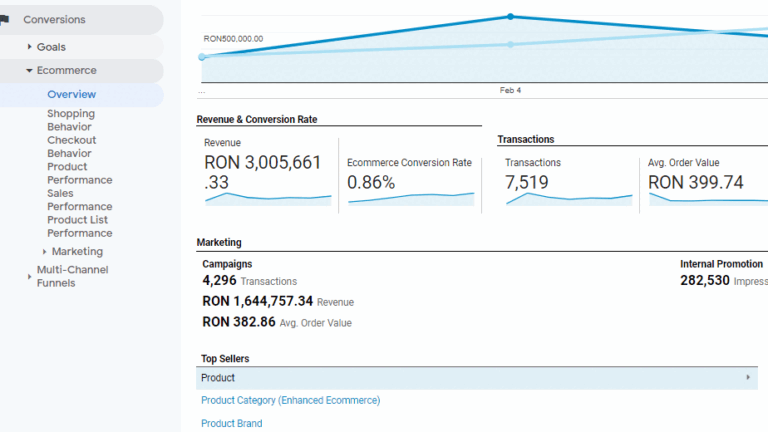 Reports in Google Analytics[/caption]